


插件 API
Vite 插件扩展了 Rolldown 的插件接口,增加了一些 Vite 特定的选项。因此,你可以编写一次 Vite 插件,让它在开发和构建中都能工作。
建议在阅读以下部分之前,先浏览 Rolldown 的插件文档。
编写插件
Vite 致力于开箱即用地提供成熟的模式,所以在创建新插件之前,请确保你查看了 功能指南,以确认你的需求是否已经被覆盖。同时也请查看可用的社区插件,包括 兼容的 Rollup 插件 和 Vite 专用插件。
创建插件时,你可以将其内联在 vite.config.js 中。没有必要为此创建一个新的包。一旦你发现某个插件在你的项目中很有用,可以考虑 在生态系统中 分享它,以帮助他人。
TIP
在学习、调试或编写插件时,我们建议在项目中包含 vite-plugin-inspect。它允许你检查 Vite 插件的中间状态。安装后,你可以访问 localhost:5173/__inspect/ 来检查项目的模块和转换堆栈。查看 vite-plugin-inspect 文档 中的安装说明。 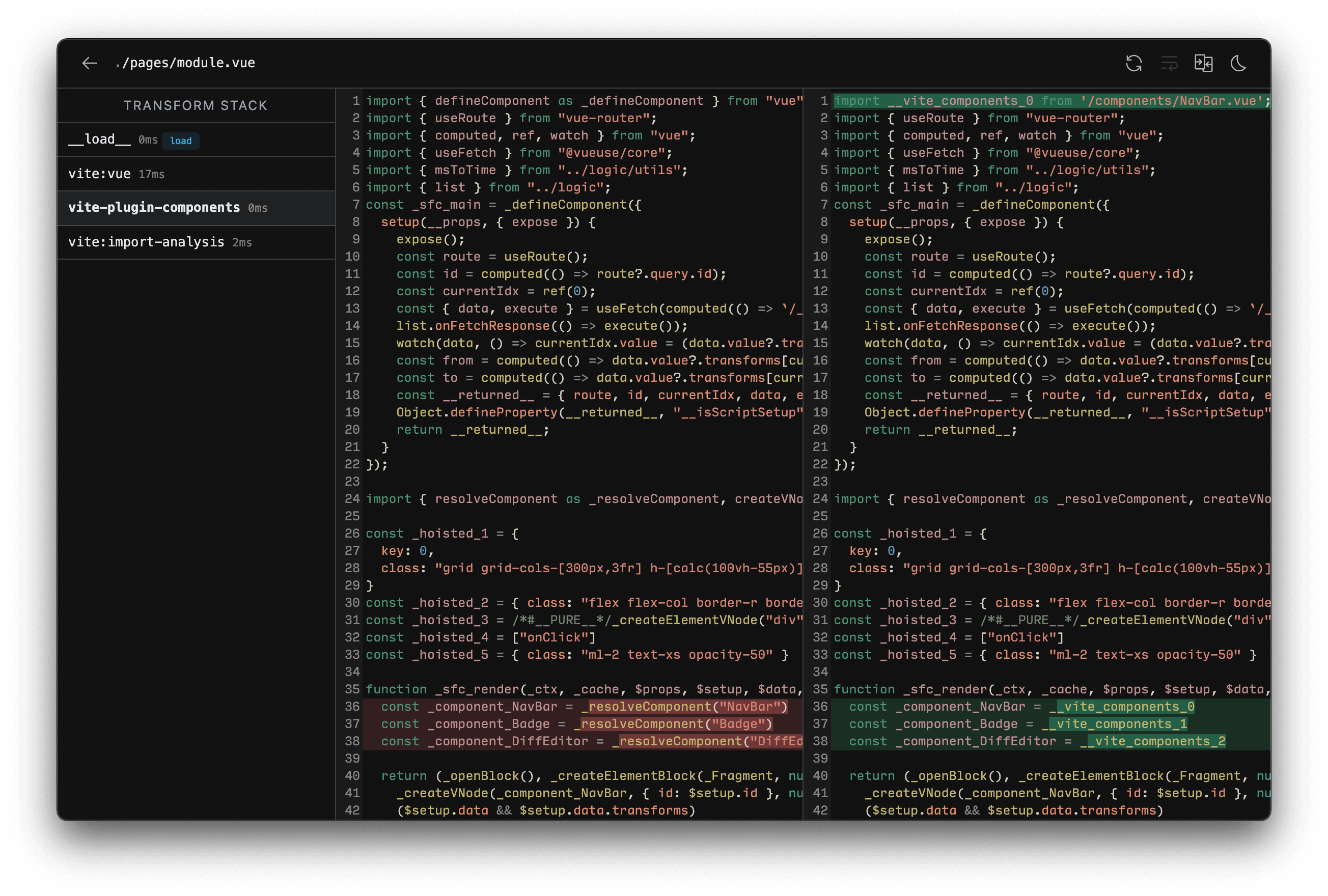
约定
如果插件不使用 Vite 特定的钩子并且可以实现为 兼容的 Rolldown 插件,则建议使用 Rolldown 插件命名约定。
- Rolldown 插件应该有一个清晰的名称,带有
rolldown-plugin-前缀。 - 在 package.json 的
keywords字段中包含rolldown-plugin和vite-plugin关键字。
这使得插件也可以用于纯 Rolldown 或基于 Rollup 的项目。
对于仅适用于 Vite 的插件
- Vite 插件应该有一个清晰的名称,带有
vite-plugin-前缀。 - 在 package.json 的
keywords字段中包含vite-plugin关键字。 - 在插件文档中包含一个部分,详细说明为什么它仅是 Vite 插件(例如,它使用了 Vite 特定的插件钩子)。
如果你的插件仅适用于特定框架,其名称应作为前缀的一部分包含在内。
- Vue 插件使用
vite-plugin-vue-前缀 - React 插件使用
vite-plugin-react-前缀 - Svelte 插件使用
vite-plugin-svelte-前缀
另请参阅 虚拟模块约定。
插件配置
用户会将插件添加到项目的 devDependencies 中,并使用 plugins 数组选项进行配置。
import vitePlugin from 'vite-plugin-feature'
import rollupPlugin from 'rollup-plugin-feature'

export default defineConfig({
  plugins: [vitePlugin(), rollupPlugin()],
})
值为 falsy 的插件将被忽略,这可以用于轻松激活或停用插件。
plugins 也接受预设,包括将几个插件作为单个元素。这对于使用多个插件实现的复杂功能(如框架集成)很有用。数组将在内部被扁平化。
// 框架插件
import frameworkRefresh from 'vite-plugin-framework-refresh'
import frameworkDevtools from 'vite-plugin-framework-devtools'

export default function framework(config) {
  return [frameworkRefresh(config), frameworkDevTools(config)]
}import { defineConfig } from 'vite'
import framework from 'vite-plugin-framework'
export default defineConfig({
plugins: [framework()],
})简单示例
TIP
将 Vite/Rolldown/Rollup 插件编写为返回实际插件对象的工厂函数是常见的约定。该函数可以接受选项,允许用户自定义插件的行为。
转换自定义文件类型
const fileRegex = /\.(my-file-ext)$/

export default function myPlugin() {
  return {
    name: 'transform-file',

    transform: {
      filter: {
        id: fileRegex,
      },
      handler(src, id) {
        return {
          code: compileFileToJS(src),
          map: null, // 如果可用则提供源代码映射
        }
      },
    },
  }
}
导入虚拟文件
虚拟模块允许你使用常规的 ESM 导入语法,将构建时信息传递给源文件。有关完整约定,请参阅虚拟模块约定。
import { exactRegex } from '@rolldown/pluginutils'

export default function myPlugin() {
  const virtualModuleId = 'virtual:my-module'
  const resolvedVirtualModuleId = '\0' + virtualModuleId

  return {
    name: 'my-plugin', // 必填,将显示在警告和错误中
    resolveId: {
      filter: { id: exactRegex(virtualModuleId) },
      handler() {
        return resolvedVirtualModuleId
      },
    },
    load: {
      filter: { id: exactRegex(resolvedVirtualModuleId) },
      handler() {
        return `export const msg = "来自虚拟模块"`
      },
    },
  }
}
这允许在 JavaScript 中导入模块:
import { msg } from 'virtual:my-module'

console.log(msg)
在 Vite 中,由于 \0 不是导入 URL 中允许使用的字符, \0{id} 虚拟 ID 在开发期间会在浏览器中被编码为 /@id/__x00__{id}。在进入插件流水线之前,该 ID 会被解码回来,因此插件钩子代码不会看到这种形式。
Rolldown 钩子
在开发期间,Vite 开发服务器创建一个插件容器,以与 Rolldown 相同的方式调用 Rolldown 构建钩子。
所有 Rolldown 钩子都是环境级钩子。
以下钩子在服务器启动时调用一次:
以下钩子在每个传入模块请求时调用:
这些钩子还有一个扩展的 options 参数,带有额外的 Vite 特定属性。你可以在 SSR 文档 中阅读更多内容。
某些 resolveId 调用的 importer 值可能是根目录下通用 index.html 的绝对路径,因为由于 Vite 的无捆绑开发服务器模式,并不总是能够推导出实际的导入者。对于在 Vite 解析管道内处理的导入,可以在导入分析阶段跟踪导入者,提供正确的 importer 值。
以下钩子在服务器关闭时调用:
注意 moduleParsed 钩子在开发期间不被调用,因为 Vite 为了获得更好的性能,会避免进行完整的 AST 解析。
输出生成钩子(closeBundle 除外)在开发期间不被调用。
Vite 特定钩子
Vite 插件还可以提供服务于 Vite 特定目的的钩子。这些钩子被 Rollup 忽略。
config
Type:
(config: UserConfig, env: { mode: 'build' | 'serve', command: string, isSsrBuild?: boolean, isPreview?: boolean }) => UserConfig | null | voidKind:
async,sequentialScope: Global
在 Vite 配置被解析之前修改它。该钩子接收原始用户配置(CLI 选项与配置文件合并)和当前配置环境,其中暴露了正在使用的
mode和command。它可以返回一个部分配置对象,该对象将被深度合并到现有配置中,或者直接修改配置(如果默认合并无法达到预期结果)。示例:
js// 返回部分配置(推荐) const partialConfigPlugin = () => ({ name: 'return-partial', config: () => ({ resolve: { alias: { foo: 'bar', }, }, }), }) // 直接修改配置(仅在合并不起作用时使用) const mutateConfigPlugin = () => ({ name: 'mutate-config', config(config, { command }) { if (command === 'build') { config.root = 'foo' } }, })注意
用户插件在此钩子运行之前被解析,因此在
config钩子内注入其他插件将无效。
configResolved
Type:
(config: ResolvedConfig) => void | Promise<void>Kind:
async,parallelScope: Global
在 Vite 配置被解析后调用。使用此钩子读取和存储最终解析的配置。当插件需要根据运行的命令执行不同操作时,这也很有用。
示例:
jsconst examplePlugin = () => { let config return { name: 'read-config', configResolved(resolvedConfig) { // 存储解析后的配置 config = resolvedConfig }, // 在其他钩子中使用存储的配置 transform(code, id) { if (config.command === 'serve') { // 开发:插件由开发服务器调用 } else { // 构建:插件由 Rollup 调用 } }, } }注意在开发中
command值为serve(在 cli 中vite、vite dev和vite serve是别名)。
configureServer
Type:
(server: ViteDevServer) => (() => void) | void | Promise<(() => void) | void>Kind:
async,sequentialSee also: ViteDevServer
Scope: Global
用于配置开发服务器的钩子。最常见的用例是向内部 connect 应用添加自定义中间件:
jsconst myPlugin = () => ({ name: 'configure-server', configureServer(server) { server.middlewares.use((req, res, next) => { // 自定义处理请求... }) }, })注入后置中间件
configureServer钩子在内部中间件安装之前调用,因此默认情况下自定义中间件将在内部中间件之前运行。如果你想 在 内部中间件 之后 注入中间件,你可以从configureServer返回一个函数,该函数将在内部中间件安装后调用:jsconst myPlugin = () => ({ name: 'configure-server', configureServer(server) { // 返回一个在内部中间件安装后调用的后置钩子 return () => { server.middlewares.use((req, res, next) => { // 自定义处理请求... }) } }, })存储服务器访问权限
在某些情况下,其他插件钩子可能需要访问开发服务器实例(例如访问 WebSocket 服务器、文件系统监视器或模块图)。此钩子也可用于存储服务器实例以便在其他钩子中访问:
jsconst myPlugin = () => { let server return { name: 'configure-server', configureServer(_server) { server = _server }, transform(code, id) { if (server) { // 使用服务器... } }, } }注意在生产构建运行时不会调用
configureServer,因此你的其他钩子需要防范其缺失。
configurePreviewServer
Type:
(server: PreviewServer) => (() => void) | void | Promise<(() => void) | void>Kind:
async,sequentialSee also: PreviewServer
Scope: Global
与
configureServer相同,但用于预览服务器。与configureServer类似,configurePreviewServer钩子在其他中间件安装之前调用。如果你想 在 其他中间件 之后 注入中间件,你可以从configurePreviewServer返回一个函数,该函数将在内部中间件安装后调用:jsconst myPlugin = () => ({ name: 'configure-preview-server', configurePreviewServer(server) { // 返回一个在其他中间件安装后调用的后置钩子 return () => { server.middlewares.use((req, res, next) => { // 自定义处理请求... }) } }, })
closeServer
Type:
(context: { reason: 'restart' | 'close' }) => void | Promise<void>Kind:
async,parallelScope: Global
在开发服务器重启或关闭时、服务器完成拆除后调用。通常用于释放在
configureServer中创建的资源。context.reason用于区分这两种情况:'restart':服务器正在重启(例如配置文件发生变化,或调用了server.restart())。'close':服务器正在关闭(例如使用q快捷键,或调用了server.close())。
jsconst myPlugin = () => { let resource return { name: 'close-server', configureServer(server) { resource = createResource() }, async closeServer({ reason }) { if (reason === 'close') { await resource.dispose() } }, } }
closePreviewServer
Type:
() => void | Promise<void>Kind:
async,parallelScope: Global
与
closeServer相同,但用于预览服务器。预览服务器不会重启,因此没有reason。jsconst myPlugin = () => { let resource return { name: 'close-preview-server', configurePreviewServer(server) { resource = createResource() }, async closePreviewServer() { await resource.dispose() }, } }
transformIndexHtml
Type:
IndexHtmlTransformHook | { order?: 'pre' | 'post', handler: IndexHtmlTransformHook }Kind:
async,sequentialScope: Per-environment
用于转换 HTML 入口文件(如
index.html)的专用钩子。该钩子接收当前 HTML 字符串和转换上下文。上下文在开发期间暴露ViteDevServer实例,在构建期间暴露 Rolldown 输出包。该钩子可以是异步的,并且可以返回以下内容之一:
- 转换后的 HTML 字符串
- 要注入到现有 HTML 的标签描述对象数组(
{ tag, attrs, children })。每个标签还可以指定应该注入到哪里(默认是前置到<head>) - 包含两者的对象
{ html, tags }
默认情况下
order为undefined,此钩子在 HTML 转换后应用。为了注入应该经过 Vite 插件管道的脚本,order: 'pre'将在处理 HTML 之前应用钩子。order: 'post'在所有order为 undefined 的钩子应用后应用钩子。基本示例:
jsconst htmlPlugin = () => { return { name: 'html-transform', transformIndexHtml(html) { return html.replace( /<title>(.*?)<\/title>/, `<title>Title replaced!</title>`, ) }, } }完整钩子签名:
tstype IndexHtmlTransformHook = ( html: string, ctx: { path: string filename: string server?: ViteDevServer bundle?: import('rolldown').OutputBundle chunk?: import('rolldown').OutputChunk originalUrl?: string }, ) => IndexHtmlTransformResult | void | Promise<IndexHtmlTransformResult | void> type IndexHtmlTransformResult = | string | HtmlTagDescriptor[] | { html: string tags: HtmlTagDescriptor[] } interface HtmlTagDescriptor { tag: string /** * 属性值将在需要时自动转义 */ attrs?: Record<string, string | boolean> children?: string | HtmlTagDescriptor[] /** * 默认:'head-prepend' */ injectTo?: 'head' | 'body' | 'head-prepend' | 'body-prepend' }注意
如果你使用的框架对入口文件有自定义处理(例如 SvelteKit),则不会调用此钩子。
handleHotUpdate
Type:
(ctx: HmrContext) => Array<ModuleNode> | void | Promise<Array<ModuleNode> | void>Kind:
async,sequentialSee also: HMR API
Scope: Per-environment
执行自定义 HMR 更新处理。该钩子接收具有以下签名的上下文对象:
tsinterface HmrContext { file: string timestamp: number modules: Array<ModuleNode> read: () => string | Promise<string> server: ViteDevServer }modules是受更改文件影响的模块数组。它是一个数组,因为单个文件可能映射到多个服务模块(例如 Vue SFC)。read是一个异步读取函数,返回文件的内容。提供此函数是因为在某些系统上,文件更改回调可能在编辑器完成更新文件之前触发得太快,直接fs.readFile将返回空内容。传入的读取函数标准化了此行为。
该钩子可以选择:
过滤和缩小受影响的模块列表,以便 HMR 更准确。
返回一个空数组并执行完全重新加载:
jshandleHotUpdate({ server, modules, timestamp }) { // 手动使模块失效 const invalidatedModules = new Set() for (const mod of modules) { server.moduleGraph.invalidateModule( mod, invalidatedModules, timestamp, true ) } server.ws.send({ type: 'full-reload' }) return [] }返回一个空数组并通过向客户端发送自定义事件执行完全自定义 HMR 处理:
jshandleHotUpdate({ server }) { server.ws.send({ type: 'custom', event: 'special-update', data: {} }) return [] }客户端代码应使用 HMR API 注册相应的处理程序(这可以由同一插件的
transform钩子注入):jsif (import.meta.hot) { import.meta.hot.on('special-update', (data) => { // 执行自定义更新 }) }
插件上下文元数据
对于可以访问插件上下文的插件钩子,Vite 会在 this.meta 上暴露其他属性:
this.meta.viteVersion:当前的 Vite 版本字符串(例如"8.0.0")。
检测由 Rolldown 驱动的 Vite
this.meta.rolldownVersion 仅适用于由 Rolldown 驱动的 Vite(即 Vite 8+)。你可以用它来检测当前的 Vite 实例是否由 Rolldown 驱动:
function versionCheckPlugin(): Plugin {
  return {
    name: 'version-check',
    buildStart() {
      if (this.meta.rolldownVersion) {
        // 仅在运行于由 Rolldown 驱动的 Vite 时执行某些操作
      } else {
        // 如果在由 Rollup 驱动的 Vite 上运行则执行其他操作
      }
    },
  }
}
输出 Bundle 元数据
在构建期间,Vite 会用一个 Vite 特定的 viteMetadata 字段增强 Rolldown 的构建输出对象。
可通过以下方式访问:
RenderedChunk(例如在renderChunk和augmentChunkHash中)OutputChunk和OutputAsset(例如在generateBundle和writeBundle中)
viteMetadata 提供:
viteMetadata.importedCss: Set<string>viteMetadata.importedAssets: Set<string>
这在编写需要检查发出的 CSS 和静态资产而不依赖 build.manifest 的插件时很有用。
示例:
function outputMetadataPlugin(): Plugin {
  return {
    name: 'output-metadata-plugin',
    enforce: 'post',
    generateBundle(_, bundle) {
      for (const output of Object.values(bundle)) {
        const css = output.viteMetadata?.importedCss
        const assets = output.viteMetadata?.importedAssets
        if (!css?.size && !assets?.size) continue

        console.log(output.fileName, {
          css: css ? [...css] : [],
          assets: assets ? [...assets] : [],
        })
      }
    },
  }
}
引用发出的资产
要从插件中发出资产,请调用 this.emitFile({ type: 'asset', ... })。它会返回一个 referenceId,你可以使用它生成资产的 URL,因为在生成 bundle 之前,资产的最终文件名尚未知晓。
在 JavaScript 中
使用 import.meta.ROLLDOWN_FILE_URL_<referenceId>:
const referenceId = this.emitFile({
  type: 'asset',
  name: 'icon.png',
  source: fileContent,
})

// it's a JavaScript expression, so append any query or hash with string concatenation
return `export default import.meta.ROLLDOWN_FILE_URL_${referenceId} + '#frag'`
在 CSS 或 HTML 中
import.meta.ROLLDOWN_FILE_URL_<referenceId> 仅适用于 JavaScript 表达式位置。在 CSS 或 HTML 中,请改用 __VITE_ASSET__<referenceId>__ 标记,并将查询参数或哈希紧接在其后追加:
background: url(__VITE_ASSET__<referenceId>__#frag);插件排序
Vite 插件还可以指定一个 enforce 属性(类似于 webpack loader)来调整其应用顺序。enforce 的值可以是 "pre" 或 "post"。解析后的插件将按以下顺序排列:
- 别名
- 带有
enforce: 'pre'的用户插件 - Vite 核心插件
- 没有 enforce 值的用户插件
- Vite 构建插件
- 带有
enforce: 'post'的用户插件 - Vite 构建后插件(minify, manifest, reporting)
请注意,这与钩子顺序是分开的,它们仍然像往常一样单独受其 order 属性 的约束,这是 Rolldown 钩子的常规做法。
条件应用
默认情况下,插件会在 serve 和 build 期间都被调用。如果插件需要仅在 serve 或 build 期间有条件地应用,请使用 apply 属性以便仅在 'build' 或 'serve' 期间调用它们:
function myPlugin() {
  return {
    name: '仅构建',
    apply: 'build', // 或 'serve'
  }
}
也可以使用函数进行更精确的控制:
apply(config, { command }) {
  // 仅在 build 时应用,但不用于 SSR
  return command === 'build' && !config.build.ssr
}
Rolldown 插件兼容性
相当数量的 Rolldown / Rollup 插件可以直接作为 Vite 插件工作(例如 @rollup/plugin-alias 或 @rollup/plugin-json),但并非所有插件都可以,因为某些插件钩子在未打包的开发服务器上下文中没有意义。
一般来说,只要 Rolldown / Rollup 插件符合以下标准,它就应该可以作为 Vite 插件正常工作:
- 它不使用
moduleParsed钩子。 - 它不依赖 Rolldown 特定选项,如
transform.inject - 它在 bundle 阶段钩子和 output 阶段钩子之间没有强耦合。
如果 Rolldown / Rollup 插件仅适用于构建阶段,则可以在 build.rolldownOptions.plugins 下指定。它将作为带有 enforce: 'post' 和 apply: 'build' 的 Vite 插件同样工作。
你还可以用仅适用于 Vite 的属性增强现有的 Rolldown / Rollup 插件:
import example from 'rolldown-plugin-example'
import { defineConfig } from 'vite'

export default defineConfig({
  plugins: [
    {
      ...example(),
      enforce: 'post',
      apply: 'build',
    },
  ],
})
路径规范化
Vite 在解析 id 时会规范化路径以使用 POSIX 分隔符 ( / ),同时保留 Windows 中的卷。另一方面,Rollup 默认保持解析后的路径不变,因此在 Windows 中解析后的 id 具有 win32 分隔符 ( \ )。但是,Rollup 插件在内部使用来自 @rollup/pluginutils 的 normalizePath 工具函数,它在执行比较之前将分隔符转换为 POSIX。这意味着当这些插件在 Vite 中使用时,include 和 exclude 配置模式以及其他针对解析后 id 比较的类似路径可以正常工作。
因此,对于 Vite 插件,在将路径与解析后的 id 进行比较时,重要的是首先规范化路径以使用 POSIX 分隔符。vite 模块导出了一个等效的 normalizePath 工具函数。
import { normalizePath } from 'vite'

normalizePath('foo\\bar') // 'foo/bar'
normalizePath('foo/bar') // 'foo/bar'
过滤,include/exclude 模式
Vite 暴露了 @rollup/pluginutils 的 createFilter 函数,以鼓励 Vite 特定插件和集成使用标准的 include/exclude 过滤模式,Vite 核心本身也使用这种模式。
钩子过滤器
Rolldown 引入了 钩子过滤器功能 以减少 Rust 和 JavaScript 运行时之间的通信开销。此功能允许插件指定模式来确定何时应调用钩子,通过避免不必要的钩子调用来提高性能。
Rollup 4.38.0+ 和 Vite 6.3.0+ 也支持此功能。为了使你的插件与旧版本向后兼容,请确保也在钩子处理程序内部运行过滤器。
export default function myPlugin() {
  const jsFileRegex = /\.js$/

  return {
    name: 'my-plugin',
    // 示例:仅对 .js 文件调用 transform
    transform: {
      filter: {
        id: jsFileRegex,
      },
      handler(code, id) {
        // 为了向后兼容的额外检查
        if (!jsFileRegex.test(id)) return null

        return {
          code: transformCode(code),
          map: null,
        }
      },
    },
  }
}
TIP
@rolldown/pluginutils 导出了一些用于钩子过滤器的工具函数,如 exactRegex 和 prefixRegex。为了方便起见,这些也从 rolldown/filter 重新导出。
Chunk 导入映射信息
实验性
此功能处于实验阶段,未来可能会发生变化。
当启用 build.chunkImportMap 选项时,生成的 chunk 中的 import 语句会为每个 chunk 使用唯一 ID,而不是文件路径。
要获取从 chunk ID 到文件路径的映射,你可以在 generateBundle 钩子或 writeBundle 钩子中访问发射到 bundle 的 import map。该 import map 的名称由 build.rolldownOptions.experimental.chunkImportMap.fileName 指定(默认为 importmap.json)。
function accessImportMap() {
  let config: ResolvedConfig
  return {
    name: 'access-import-map',
    configResolved(resolvedConfig) {
      config = resolvedConfig
    },
    generateBundle(options, bundle) {
      const chunkImportMap =
        config.build.rolldownOptions.experimental?.chunkImportMap
      if (chunkImportMap) {
        const importMapFilename =
          typeof chunkImportMap === 'object' && chunkImportMap.fileName
            ? chunkImportMap.fileName
            : 'importmap.json'
        const importMap = bundle[importMapFilename]! as OutputAsset
        const mapping = JSON.parse(importMap.source).imports
        console.log(mapping)
        // { "./entry.hash1.js": "./entry.hash2.js" }
      }
    },
  }
}
客户端-服务器通信
自 Vite 2.9 以来,我们提供了一些工具函数来帮助插件处理与客户端的通信。
服务器到客户端
在插件端,我们可以使用 server.ws.send 向客户端广播事件:
export default defineConfig({
  plugins: [
    {
      // ...
      configureServer(server) {
        server.ws.on('connection', () => {
          server.ws.send('my:greetings', { msg: 'hello' })
        })
      },
    },
  ],
})
注意
我们建议始终为事件名称添加前缀,以避免与其他插件冲突。
在客户端,使用 hot.on 来监听事件:
// 客户端
if (import.meta.hot) {
  import.meta.hot.on('my:greetings', (data) => {
    console.log(data.msg) // 你好
  })
}
客户端到服务器
要从客户端向服务器发送事件,我们可以使用 hot.send:
// 客户端
if (import.meta.hot) {
  import.meta.hot.send('my:from-client', { msg: 'Hey!' })
}
然后使用 server.ws.on 并在服务器端监听事件:
export default defineConfig({
  plugins: [
    {
      // ...
      configureServer(server) {
        server.ws.on('my:from-client', (data, client) => {
          console.log('来自客户端的消息:', data.msg)
          // 仅回复给客户端(如果需要)
          client.send('my:ack', { msg: 'Hi! I got your message!' })
        })
      },
    },
  ],
})
自定义事件的 TypeScript
在内部,Vite 从 CustomEventMap 接口推断 payload 的类型,可以通过扩展该接口来为自定义事件添加类型:
注意
指定 TypeScript 声明文件时,请确保包含 .d.ts 扩展名。否则,TypeScript 可能不知道模块正在尝试扩展哪个文件。
import 'vite/types/customEvent.d.ts'

declare module 'vite/types/customEvent.d.ts' {
  interface CustomEventMap {
    'custom:foo': { msg: string }
    // '事件键': payload
  }
}
此接口扩展被 InferCustomEventPayload<T> 用于推断事件 T 的 payload 类型。有关如何使用此接口的更多信息,请参阅 HMR API 文档。
type CustomFooPayload = InferCustomEventPayload<'custom:foo'>
import.meta.hot?.on('custom:foo', (payload) => {
  // payload 的类型将是 { msg: string }
})
import.meta.hot?.on('unknown:event', (payload) => {
  // payload 的类型将是 any
})